1 2 | for i in range(0, 21): print(i ** 2) |

This is the third article in the series Basic Data Visualization in Python. In this article, we're going to cover the basics of control flow using compound statements. If you haven't read the previous article yet, I would suggest reading it.
This article will consist of the control flow Compound Statements found in python.
Boolean Values: True and False
if: (conditional branches/selection statements)
for and while: (loops)
break and continue
range
enumerate
def: (functions)
Now that we're moving onto more complicated materials, it might help to perform
your experiments from the terminal python interpreter to a file. You can create
this file in the same directory as word_counter.py in the same exact way.
We'll call it example.py. You should put example.py into ~/dev/py_data_vis
if you're on Linux or Mac and example.py into
C:\Users\[user]\dev\py_data_vis, where [user] is your username. Note that
you could put the file in any directory you wanted, but putting it here is
easiest.
Remember that to make a python executable from the terminal, you must make the first line of the file
1 | #!/usr/bin/env python3
|
and run the command
user@comp:~/dev/py_data_vis$ ls -l
-rw-r--r-- 1 user group     23 Mar 30 14:52 example.py
-rwxr-xr-x 1 user group     23 Mar 30 14:52 word_counter.py
user@comp:~/dev/py_data_vis$ sudo chmod +x example.py
user@comp:~/dev/py_data_vis$ ls -l
-rwxr-xr-x 1 user group     23 Mar 30 14:52 example.py
-rwxr-xr-x 1 user group     23 Mar 30 14:52 word_counter.py
Note that ls -l wasn't strictly necessary, but it should allow us to see the
changes, notably that the line with example.py has more xs on the left and
that example.py is highlighted if your terminal highlights stuff.
Once you have example.py as an executable, you can type whatever you want to
execute after the first line, save the file, and run it using
comp:py_data_vis user$ ./example.py
Unlike in the terminal python interpreter, a python program will stop running if it hits an error, so we won't try to cause errors as we did with all the strings in the previous article.
One last thing before we can we can experiment: in the terminal python
interpreter, we could print out the value of a variable just by typing its name.
When running a python program, however, we need to use the print function. For
example, if we wanted to print out 2 + 3, we would simply write
1 2 3 | #!/usr/bin/env python3 print(2 + 3) |
which will print out
user@comp:~/dev/py_data_vis$ ./example.py
5
user@comp:~/dev/py_data_vis$
Compound statements are statements that will group other statements together, most commonly seen in controling the flow of the program. They all have the syntax:
compound_statement relevant_information:
    statement
    statement
    statement
    ...

statement
In the python interpreter, you'll see ... instead of >>> if you start a
compound statement as it's waiting for you to type the next line, which must be
indented. Once you've reached your last statement, hit Enter/Return a few times
until you see the >>>.
We can't really talk about control flow without first establishing boolean
values and boolean operators. A boolean value is either True
or False. Boolean values can be created by directly using True and False,
using a boolean operator, or by coercion.
Boolean Operators consist of
==: a == b will be True if a and b are equal.
!=: a != b will be True if a and b are not equal.
<: a < b will be True if a is less than b.
>: a > b will be True if a is greater than b.
<=: a <= b will be True if a is less than or equal to
b.
>=: a <= b will be True if a is greater than or equal
to b.
and: a and b will be True if both a and b are True.
or: a or b will be True if at least one of a or b is True.
not: not a will be True if a is False. Essentially, the output
is the opposite of the input.
in: a in b will be True if a can be found somewhere in b,
though it's kind of complicated because it's also used in a for loop though
it's still technically a pure boolean operator. We'll see better examples in the
future.
For example, if you wanted to test whether a username and a password hashed with
a salt (DO NOT STORE PASSWORDS IN
PLAINTEXT OR EVEN HASHED WITHOUT A SALT.), you would use the boolean
expression (username == s_username) and (hashed_password ==
s_hashed_password), where the s_ variables represent the data you have stored
locally. You can combine boolean expressions however you want using any of the
operators above.
Most non-booleans can be coerced into booleans by putting them where
booleans would normally show up. Generally, empty or zero objects are False
and everything else is True.
| Type | What Evaluates to
False |
English |
|---|---|---|
| Integer | 0 |
Zero |
| Floating Point | 0.0 |
Zero |
| String | "" |
The empty string |
| List | [] |
An empty list |
| Tuple | () |
An empty tuple |
| Dictionary | {} |
An empty dictionary |
| Generic Object | None |
None is equivalent to null in Java and
nullptr in C++ |
For example, the expression (7 and 0) or not ("" and []) ⇒ (True and
False) or not (False and False) ⇒ False or not (False) ⇒ False
or True ⇒ True.
if (conditional branches)An if statement has a main syntax and two extensions, else and elif, as
shown below:
if condition:
    statement
    statement
    ...

if condition:
    statement
    statement
    ...
else:
    statement
    ...

if condition:
    statement
elif condition:
    statement
    statement
else:
    statement
If condition is true, then the indented statements below it will be executed.
If condition is false, then the indented statements below it will not be
executed. For example, try putting the example code in example.py and running
it. Predict what you think will happen before running it.
1 2 3 4 5 6 7 8 9 10 11 12 13 14 15 16 17 18 19 20 21 22 23 24 25 26 27 28 29 30 31 32 33 34 35 36 37 38 39 40 41 42 43 44 45 46 47 48 49 50 51 52 53 54 55 56 57 58 59 60 61 62 63 64 65 66 67 68 69 70 71 72 | #!/usr/bin/env python3 if 2 ** 3 < 3 ** 2: print("Two cubed is less than three squared.") if 1 > 2: print("Something went wrong, since this statement should never execute.") if 0.1 + 0.2 != 0.3: print("I should learn about floating point numbers to understand why this happened.") if 7: print("7 => True.") else: print("7 => False.") if 0: print("0 => True.") else: print("0 => False.") if 0.0: print("0.0 => True.") else: print("0.0 => False.") if "": print('"" => True.') else: print('"" => False.') if []: print('[] => True.') else: print('[] => False.') if (): print('() => True.') else: print('() => False.') if {}: print('{} => True.') else: print('{} => False.') if None: print("None => True.") else: print("None => False.") if "apple" in 'Text with the word "apple"': print('"apple" was found in the text.') else: print('"apple" was not found in the text.') if 'rock' in 'Text with the word "apple"': print('"rock" was found in the text.') else: print('"rock" was not found in the text.') example_dict = { "apple" : 1, "the" : 4 } if 'the' in example_dict: print('"the" was a key in example_dict.') else: print('"the" was not a key in example_dict.') if 'rock' in example_dict: print('"rock" was a key in example_dict.') else: print('"rock" was not a key in example_dict.') |
Lastly, the following statements are equivalent:
if a < b:
    a += 5
elif a > b:
    b += 5
else:
    a *= 5
    b *= 5

if a < b:
    a += 5
else:
    if a > b:
        b += 5
    else:
        a *= 5
        b *= 5
elif is just shorthand for putting an if statement inside an else block.
for and while (loops)python has for and while loops. Unlike
other programming languages, python uses a foreach loop for its for loop,
rather than the normal iteration based for loop. python will automatically
iterate over the elements of a list or things like a list. The general syntax
looks like
for element in list_of_stuff:
    # Do stuff with element
    statement
    statement
    statement

words = [ 'A', 'quick', 'brown', 'fox', 'jumped', 'over', 'the', 'lazy', 'dog',
'.']

for word in words:
    print(word)
while loops, on the other hand, work exactly like they do in other languages:
while condition:
    statement
    statement
    statement
The general rule is to use for loops when you have a list of elements or any
other known range and while loops when you don't. Once again, use whatever
best fits what you need.
break and continueThe break command will exit the innermost loop that contains it. The
continue command will skip to the next iteration of the loop. Normally, you
put them inside if statements inside a loop. For example, if you were writing a
chess program and you wanted to list all eight the spots the king could move on
a board (assuming all moves are legal), you could use a for loop and a continue
statement like so:
1 2 3 4 5 6 7 8 | #!/usr/bin/env python3 valid_moves = [] for i in range(-1, 2): for j in range(-1, 2): if (i == 0) and (j == 0): continue valid_moves += [ (i, j) ] |
Afterwards, valid_moves now contains the base moves to consider for a king.
On the other hand, break is used when you don't want to continue, usually if
you receive some kind of stop condition or you run out of valid data. For
example, if you wanted to check if a number x was prime using a brute force
algorithm, you can stop as soon as you find any prime number that divides x.
For example, let's say you have a list of primes that goes at least above the
square root of the number you want to check (i.e. all the primes you would need
to check). You could use the following code to check.
1 2 3 4 5 6 7 8 9 10 | divisor = -1 for prime in primes: if number % prime == 0: divisor = prime break if divisor != -1: print(divisor) else: print("The number is a prime.") |
In a lot of cases, you need to map some function or operation to a list. Using the tools that you have now, you might try something like:
output_list = []
for k in input_list:
    output_list += [ func(k) ]
List comprehension will allow you to replace the above with
output_list = [ func(k) for k in input_list ]
which should make your code cleaner.
range FunctionIf you absolutely need numbers and not individual elements, you can use the
range(start, stop) function, where start is the first number and stop is
the first number you don't want to use. For example, to print the numbers 0 to
20, you would use
for i in range(0, 21):
    print(i)
enumerate FunctionYou can also get both the index and the element using the enumerate function
like so:
for index, element in enumerate(list):
    print(index)
    print(str(element))
where the first element will have an index of 0. If you want to change that,
use enumerate(iterable, offset), where offset is the index you want for the
first element.
0 to 20 using a for loop.
1 2 | for i in range(0, 21): print(i ** 2) |
0 to 20 and, if the number is not
divisible by 3, print out its cube. The first few lines of your output should
look like
comp:py_data_vis user$ ./example.py
1
1
4
8
9
16
64
1 2 3 4 5 6 | #!/usr/bin/env python3 for i range(0, 21): print(i ** 2) if i % 3 != 0: print(i ** 3) |
17. Furthermore,
you can only add two more lines.
1 2 3 4 5 6 7 8 | #!/usr/bin/env python3 for i range(0, 21): if i == 17: continue print(i ** 2) if i % 3 != 0: print(i ** 3) |
4004. It should print out the result [2, 2, 7, 11, 13].
Your first few lines should be:
1 2 3 4 5 6 | #!/usr/bin/env python3 number = 4004 primes = [2, 3, 5, 7, 11, 13, 17, 19, 23, 29, 31, 37, 41, 43, 47, 53, 59, 61 ] prime_factorization = [] |
1 2 3 4 5 6 7 8 9 10 11 12 13 14 15 | #!/usr/bin/env python3 number = 4004 primes = [2, 3, 5, 7, 11, 13, 17, 19, 23, 29, 31, 37, 41, 43, 47, 53, 59, 61 ] prime_factorization = [] while number != 1: for prime in primes: if (number % prime) == 0: number /= prime prime_factorization += [ prime ] break print(prime_factorization) |
1 2 3 4 5 6 7 8 9 10 11 12 | #!/usr/bin/env python3 strings = [ "Here is a whole sentence of words.", "I've written another sentence.", "Three sentences should be enough.", "I'll use four to make sure the point comes across" ] reversed_strings = [ k[::-1] for k in strings ] for k in reversed_strings: print(k) |
I didn't use any examples with a while loop as almost all while loops that I've
used in any recent python projects have been with files (e.g. skipping to the
next non-blank line in a file) or situations we haven't covered.
def (functions)Like all modern programming languages, python has functions, which allow you
to group together statements so you can repeat code. def statements have the
base syntax:
def function_name(param_0, param_1, ...):
    statement
    statement
    statement
    return value
And you can call functions using the syntax:
function_name(parameter_0, parameter_1)
Here are some example functions:
def area_of_circle(r):
    return 3.1415926 * radius ** 2

def volume_of_cylinder(radius, height):
    return height * area_of_circle(radius)

def find_prime_factorization_for_small_numbers(number):
    primes = [2, 3, 5, 7, 11, 13, 17, 19, 23,
        29, 31, 37, 41, 43, 47, 53, 59, 61 ]
    prime_factorization = []

    while number != 1:
        for prime in primes:
            if (number % prime) == 0:
                number /= prime
                prime_factorization += [ prime ]
                break
    return prime_factorization

def reverse_strings(list_of_strings):
    return [ k[::-1] for k in list_of_strings ]
A lot of these functions are toy examples because we can't get user input through files or the command line, so we'll have to make do for now.
You can read more in this article on everything you can do with python functions, though I'll try to summarize everything as much as possible.
A lot of times, you have a function that uses the same arguments 90% of the
time. In that case, you can provide a default parameter using parameter =
default when defining the function.
def area_of_circle(radius = 1):
    return 3.1415926 * radius ** 2
If you call this function with area_of_circle(r), you will get the area of a
circle with radius r. If you call this function without an argument, you will
set radius to be one and get the area of a circle with radius 1.
You can provide arguments in any order by giving the name of the formal parameter and what you want to provide it. For example,
volume_of_cylinder(height=7, radius=8)
volume_of_cylinder(8, 7)
will give you the volume of a cylinder with radius 8 and a height of 7.
Normally, you use keyword arguments only if you provide default arguments
because both of the following lines of code will fail:
volume_of_cylinder(height=7)
volume_of_cylinder(8)
Keyword parameters are extremely useful when you have a function that takes in a large number of parameters, but most of them are the same, such as for graphing. If you want to change one parameter late in the list of parameters, you can just provide the keyword.
If you put an asterisk (*) before the last parameter name, you can provide
more arguments and every argument after it will be grouped together as a tuple
under the parameter name. For example:
def mult_add_average(mult, add, *values):
    average = 0.0
    for k in values:
        average += k
    average /= len(values)
    return mult * average + add
This function will return some constant mult times the average of all the
values in values plus some constant add. I do not know why you would use
this function; it's just a toy example.
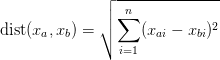 , where
xai represents the ith coordinate of point xa.
Use the sample code below to get started.
, where
xai represents the ith coordinate of point xa.
Use the sample code below to get started.
1 2 3 4 5 6 7 8 9 10 11 12 | #!/usr/bin/env python3 p1 = (1, 2, 3, 4, 5) p2 = (2, 3, 4, 5, 6) def nD_euclidean_dist(first_point, second_point): # Write your code here for i, j in zip(first_point, second_point): # Write your code here # Write your code here print(nD_euclidean_dist(p1, p2)) |
zip built in function to combine
the two points into one iterable. In the code above, i will contain
xai and j will contain xbi.]
1 2 3 4 5 6 7 8 9 10 11 12 | #!/usr/bin/env python3 p1 = (1, 2, 3, 4, 5) p2 = (2, 3, 4, 5, 6) def nD_cartesian_dist(first_point, second_point): dist_squared = 0 for i, j in zip(first_point, second_point): dist_squared += (i - j) ** 2 return dist_squared ** (1 / 2) print(nD_cartesian_dist(p1, p2)) |
1 2 3 4 5 6 | #!/usr/bin/env python3 def reverse_strings_in_list(strings): reversed_strings = [ k[::-1] for k in strings ] for k in reversed_strings: print(k) |
I'm going to be honest. There's not a lot of exercises you can do with functions specifically because they just group together code, so exercises with functions are really just exercises with code within the functions.
You might be wondering what exactly print, range, enumerate, and zip
are, since they look and act like functions, but we didn't have to define them.
In the next article, Basic Data Visualization, Pt.
4, we're going to cover some features built into python.